

2. Surfing the net
- Admin
- 8 nov 2022
- 2 Min. de lectura

Through the main menu of the social platform, there is separate access to the Debate Clubs, Scientific Resources, debates, platform users, and multimedia.

Each one of the elements of these spaces, that is to say, each club, debate, etc... is organized under a certain category and subcategory. This is so since at the time of its creation, it was chosen under certain categorical area (economy, technology, science, networks or rights), and within it, under any of its thematic subcategories, something very useful to order and provide efficient access to information from the Debate Clubs and under the Scientific Resources.
To facilitate such accessibility, the platform has an innovative "contextual tuner" for information spaces. Being in any of the six informative spaces indicated in the image above, this tuner allows you to intuitively and efficiently filter the displayed elements (clubs, debates, etc.).
To do this, this tuner is divided into three sections.
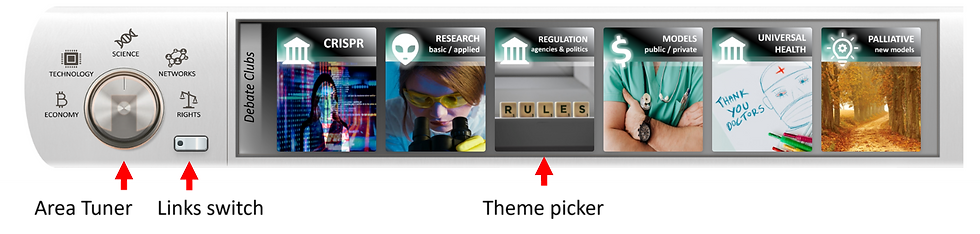
The area tuner wheel will move to any of the five knowledge areas of the platform, by clicking on their icons: economics, technology, science, networks and rights. If you notice, these are the categories that we chose in the first step when creating a Debate Club or a Scientific Resource. Thus, by tuning into a knowledge area (category), its six thematic spaces (subcategories) will appear on the right, in the thematic selector. And when clicking on a theme, all the elements will appear (clubs, recources, its debates...) that were created under that theme, in turn organized by date of creation or last modification.
Once this is understood, it is easy to deduce that the informative and multimedia spaces are thus classified into 30 global themes (5 areas of knowledge X 6 thematic spaces).
Finally, the contextual dialer has a link switcher (see image above), which shows those other thematic spaces outside the area currently selected in the switcher (economy, technology, science...), which, however, have some kind of relationship indirect weight (for example, technological topics related to the scientific area will be easily found).
Let's see all this with a practical example.
On this occasion, we are going to look for people from the social network, who have created some content under a certain theme of the economic area...

This would be the sequence of actions:
Choose "People" in the header menu. At the bottom of the screen, all platform users will appear in a list... but we want to narrow down the search. Go for it.
Click on the "Economy" icon in the Area Tuner
Select the theme "Tariff Wars"
Now, only those people who published some content associated with the theme "Tariff Wars" appear on the list under the economic area of the platform. Each record offers options such as "follow" (to receive notifications of their posts), "block", "report", send a private message through the platform... and indicate if it is a previous contact, a friend.
Finally, let's now click on a user's name... a new page will appear with their full profile. In this new page, we can learn more about him. His contacts, his followers, created Debate Clubs and Scientific Resources, etc... and we can contact him through private messages.
Do not worry if you still have doubts about its operation. The best way to learn it is by practicing on the platform itself. You will see that it is extremely simple.
Comentarios